Autoflight and autothrottle
Two flight directors, a two-axis autopilot and a yaw damper make up the AFCS, run by two identical flight guidance computers. The autothrottle moves the thrust levers. The flight mode annunciator on each PFD shows what each of them is doing.
Open the slidesWhat it does
Flight guidance, autopilot and autothrottle
- Three ways to fly: by hand on raw data with the flight directors off, by hand following the command bars, or with the autopilot coupled to the flight director.
- One flight director guides both pilots' displays. In precision approach and go-around each one guides its own side.
- The autopilot moves the ailerons and elevators through servos. When the pitch axis is out of trim, the flight guidance computer has the horizontal stabilizer moved to retrim.
- The yaw damper coordinates turns and damps the yaw oscillations that lead to Dutch roll. It moves the rudder up to ±5° and does not move the pedals.
- The autothrottle drives both thrust levers between IDLE and the TO detent. It works in all phases of flight, with or without the autopilot and flight director.
- The active vertical flight director mode decides the autothrottle mode.
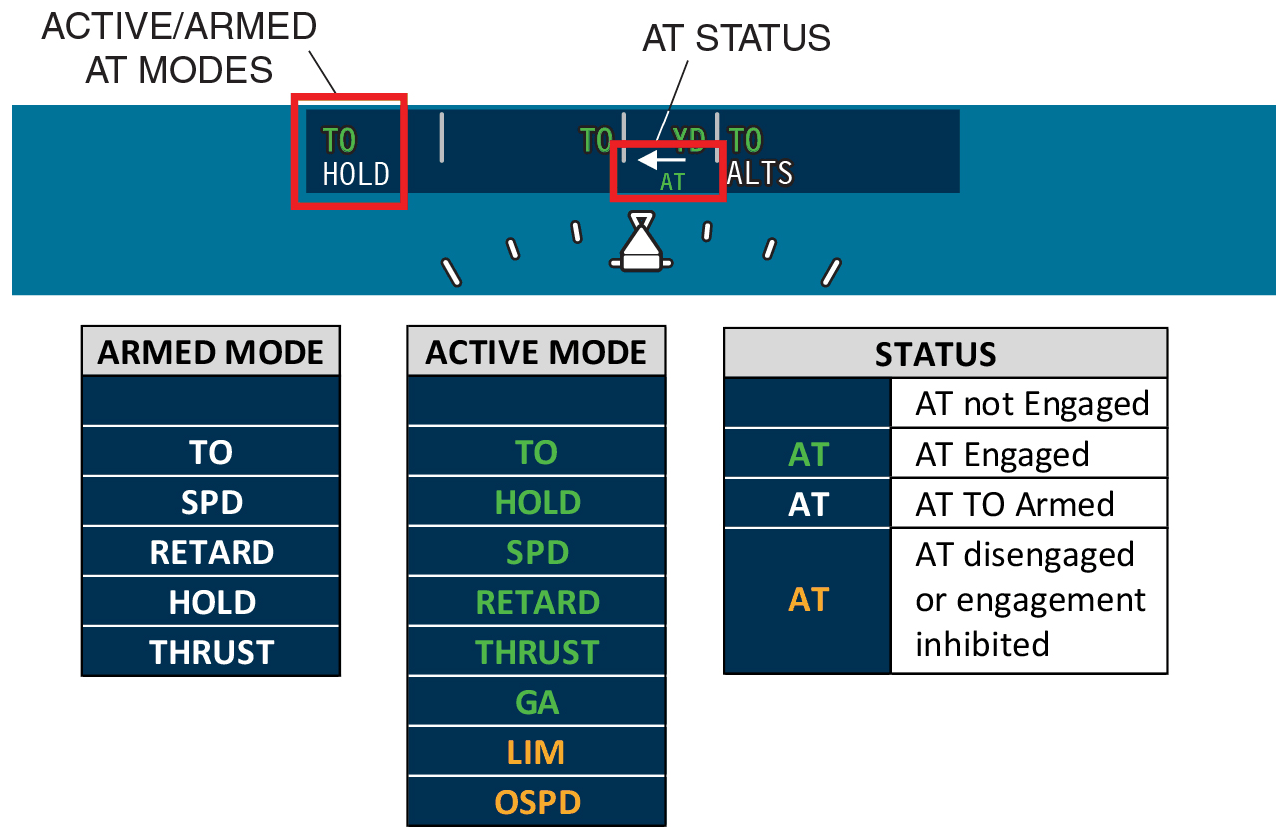
| Four sections, left to right | Autothrottle modes, lateral modes, AP, YD and AT status, vertical modes |
|---|---|
| Top line, green | Active modes |
| Bottom line, white | Armed modes |
| AT status green | Engaged |
| AT status white | TO armed |
| AT status amber | Not engaged |
| Arrow by the AP and AT status | Points to the coupled flight director side |
Engage and disengage
Flight guidance panel and controls
- The flight guidance panel (FGP) is on the glare shield, in reach of both pilots. It holds the flight director, autopilot and yaw damper controls.
- The autopilot does not engage without the yaw damper, and disengaging the yaw damper also disengages the autopilot. The yaw damper can be engaged on its own.
- Engaging the autopilot also needs both FGCs serviceable, the primary stab trim channel engaged with no trim fault, and no significant instability.
- The autopilot comes off with either MSW, the stab trim switches, the AP button, AP/YD DISC, either TO/GA switch or the YD button. It disengages by itself at stall warning or on a system fault.
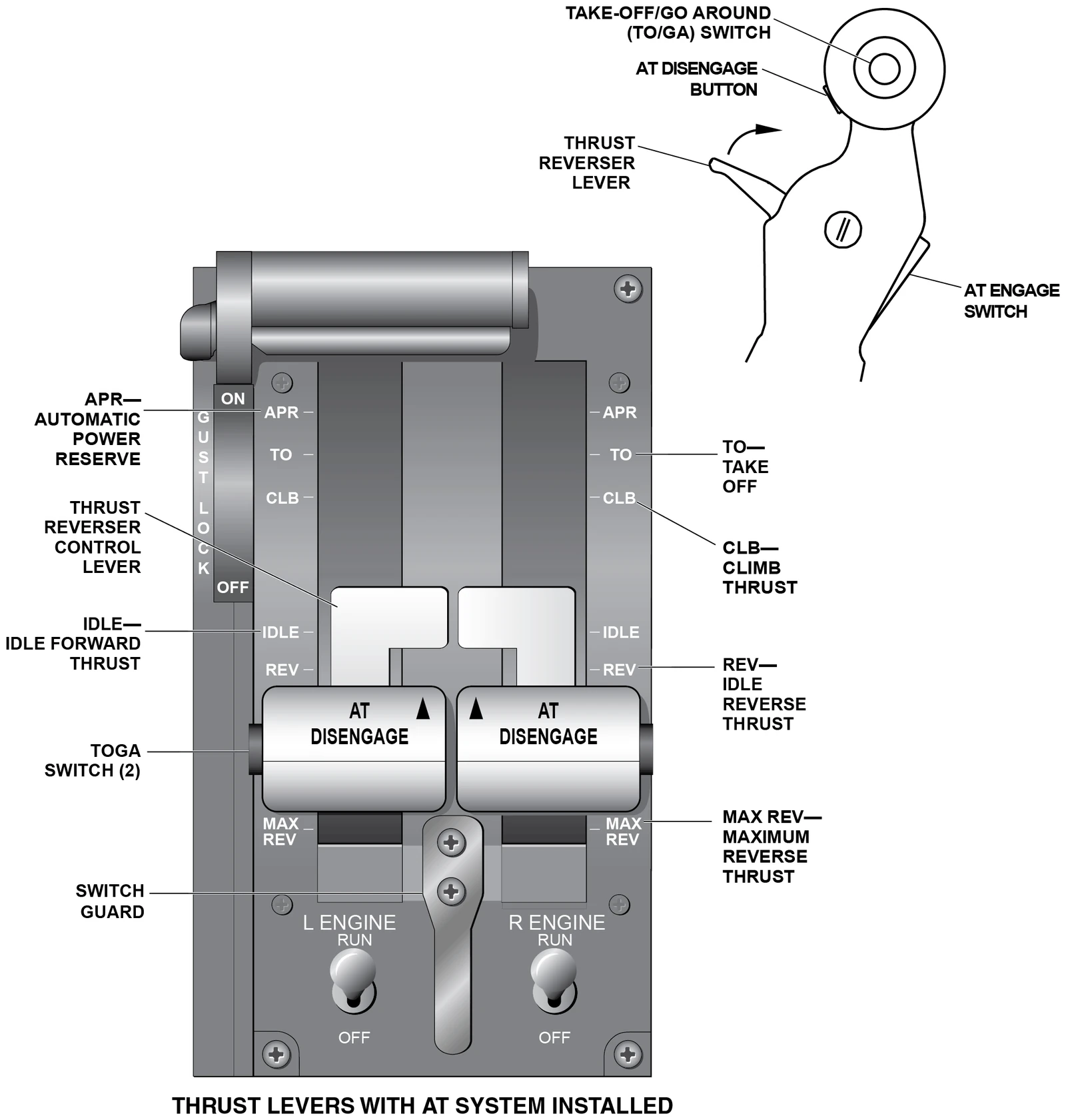
- The thrust levers move with the autothrottle. You can override it by moving them, which takes more force than normal.
| FD | Selects the onside flight director, with the basic pitch and roll modes |
|---|---|
| AP | Press to engage, press again to disengage. Green AP on the PFD. |
| YD | Engages the yaw damper |
| AP/YD DISC | Bar down: autopilot and yaw damper off together. The yaw damper cannot engage while the bar is down. |
| XFR | Selects the left or right flight director to command the autopilot |
| MSW, control wheel | Disengages the autopilot. While held, the stabilizer, configuration, Mach, aileron and rudder trims and the stall pusher are inoperative. Also cancels the red flashing AP after a fault disconnect. |
| AP/FD SYNC, control wheel | Synchronizes the flight director. With the autopilot engaged the servos let go while it is held, so you fly by hand without disconnecting. |
| AT ENGAGE, aft face of each thrust lever | Engages the autothrottle |
| AT DISENGAGE, forward face | Disengages the autothrottle. After an automatic disengage it also stops the flashing AT and the aural. |
| TO/GA, on each thrust lever | Before the takeoff roll: takeoff modes. In the air: go-around modes, and the autopilot disengages. |
Lateral and vertical
Flight director and autopilot modes

- Lateral modes: ROLL, TO, HDG, NAV, GA, APPR, BC and 1/2 BANK. ROLL is the default. It holds the heading, or the bank angle when that is over 5°.
- NAV arms when you select it, with the source (FMS1, VOR1, LOC1 and so on) in white. It captures only with valid navigation data.
- APPR is used for every approach. It arms the localizer and the glideslope. The glideslope is selected by itself, inbound, with a valid localizer.
- Vertical modes include PTCH, ALTS and ALT, TO, VNAV, VGP, FLC, VS, GS and GA. PTCH holds the pitch attitude, FLC an IAS or Mach, VS the vertical speed.
- Set an altitude with the ALT knob and the flight director climbs or descends to it, then levels off. The ALT button holds the altitude you are at.
- In the air, TO/GA puts both flight directors in GA and they work independently. The autopilot disengages, the yaw damper stays on. A captured LNV is kept.
| 1/2 BANK, maximum commanded bank | 15° |
|---|---|
| 1/2 BANK selected automatically, climbing through | 31,600 ft |
| GA pitch command | 8° nose up |
| Lateral TO and GA, bank authority | 5° |
| VS wheel, each click | 100 ft/min |
| VS range | ±8,000 fpm |
| Pitch wheel, each click | 0.5° |
| Level-off alert, before the selected altitude | About 1,000 ft |
| Altitude deviation alert | More than 200 ft |
Takeoff to touchdown
Autothrottle modes
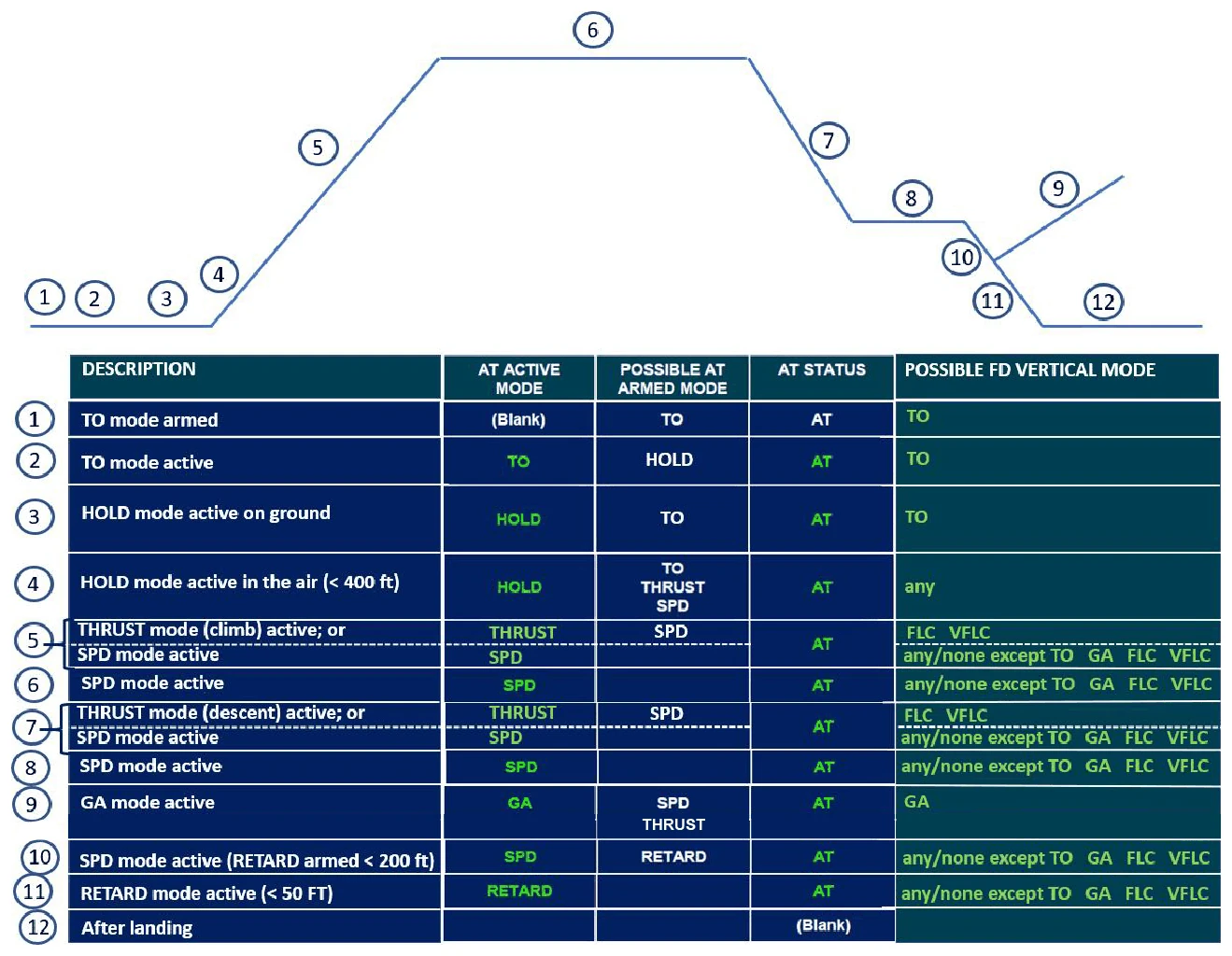
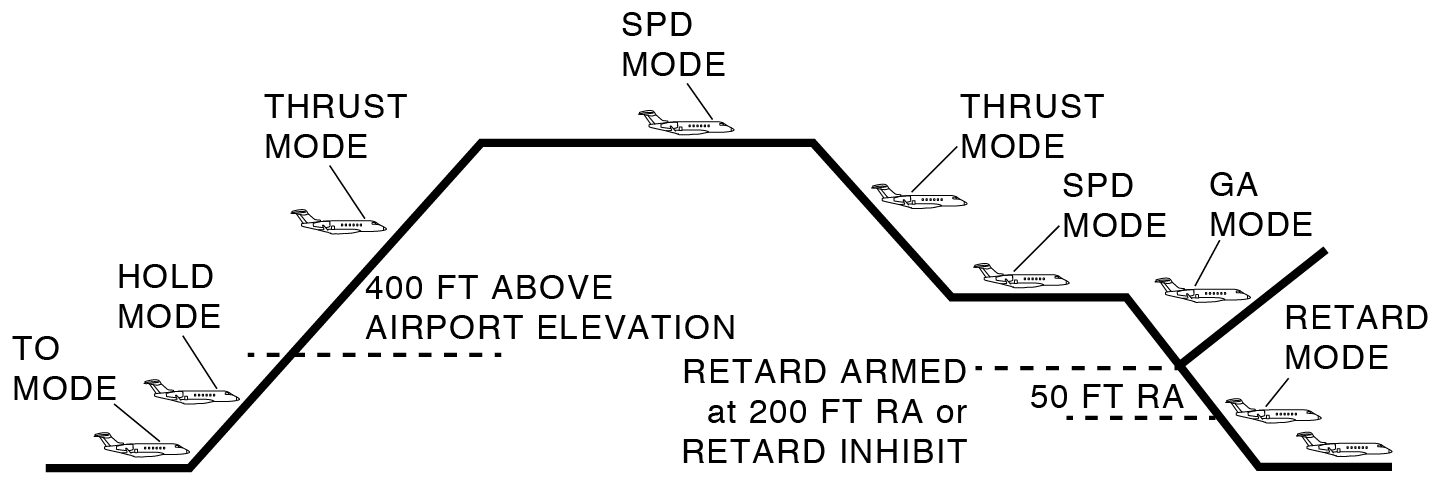
- TO arms with either AT ENGAGE switch on the ground: both engines running, takeoff flaps set, V-speeds posted, levers below 23° (mid-travel), below 60 kt and flight director vertical mode TO. TO and AT show white.
- TO goes active when the levers pass midway, and the servo carries them on to the TO detent. TO and AT turn green, HOLD arms.
- HOLD: above 60 kt with the levers in TO, the autothrottle stops moving them. HOLD stays until 400 ft above airport elevation, then the armed mode takes over.
- THRUST holds a fixed setting: the CLB detent to climb, IDLE to descend. It is active when FLC is the vertical mode.
- SPD moves the levers between IDLE and just below CLB to hold the SPEED bug. It is active with any vertical mode other than TO, GA and FLC, and when the flight director is off.
- RETARD arms below 200 ft AGL in SPD, gear down and flaps 30, not in a steep approach, with the radio altimeter working. Below 50 ft AGL it brings the levers to IDLE. After touchdown the autothrottle disengages with no alert.
- GA: TO/GA drives the levers to the TO detent.
| LIM, flashing amber | Thrust cannot hold the selected speed |
|---|---|
| OSPD, flashing amber | More than 3 kt or 0.01 Mach over VFE, VMO or MMO: the levers go toward IDLE |
| Overspeed too fast for the autothrottle | FLC OSPD, and the autothrottle disengages |
| AT DISENGAGE pressed | Amber AT flashes briefly and one "AUTOTHROTTLE" sounds |
| Automatic disengage | Amber AT flashes and "AUTOTHROTTLE, AUTOTHROTTLE" sounds until an AT DISENGAGE button is pressed |
| Automatic disengage, causes | Lever override, engine failure, stick shaker, a system fault, or an engine mismatch over 35% N1 or 15% N2 |
| Engine failure | The autothrottle disengages. Within the limits below it can be engaged again, and then moves only the operating engine's lever. |
| TO/GA on one engine | The autothrottle disengages. Push the operating lever to TO by hand. |
What not to exceed
Limits and abnormals
| Autopilot minimum engage height (climb, en route, descent) | 700 ft AGL |
|---|---|
| Autopilot minimum use, precision approach, glidepath 3.5° or less | 80 ft AGL |
| Autopilot minimum use, precision approach, glidepath between 3.5° and 4.5° | 160 ft AGL |
| Autopilot minimum use, visual and non-precision approach | 200 ft AGL |
| Maximum altitude, yaw damper off | 31,000 ft |
| Autothrottle takeoff, before 80 KIAS | AT engaged, levers in the TO detent, takeoff N1 checked, HOLD active |
| Radio altitude unavailable or invalid | Autothrottle off before 200 ft AGL |
| Abnormal procedure landing, flaps less than 30° | Autothrottle off before 200 ft AGL |
| Engine failure on takeoff | No autothrottle until the flaps are up and the aircraft is at en route climb speed |
| Single engine go-around | No autothrottle until the flaps are up and the aircraft is at en route climb speed |
| Touch and go landings | No autothrottle |
- Do not overpower the autopilot on purpose. Do not press XFR while making inputs on an FMS CDU.
- If an engine fails in a climb in or just below altitude capture, the flight director or autopilot may not hold the selected speed, and the autothrottle may already be reducing thrust. The crew may have to step in.
- AP STAB TRIM FAIL is an amber caution: the autopilot cannot trim the horizontal stabilizer. Its procedure starts with one Immediate Action Item.
- With SEC STAB TRIM ON or STAB TRIM OFF, the autopilot is inoperative.
The full module
The slides take you through the controls, the flight director and autothrottle modes from takeoff to landing, and the abnormals, then a 10-question test.
Open the slides